

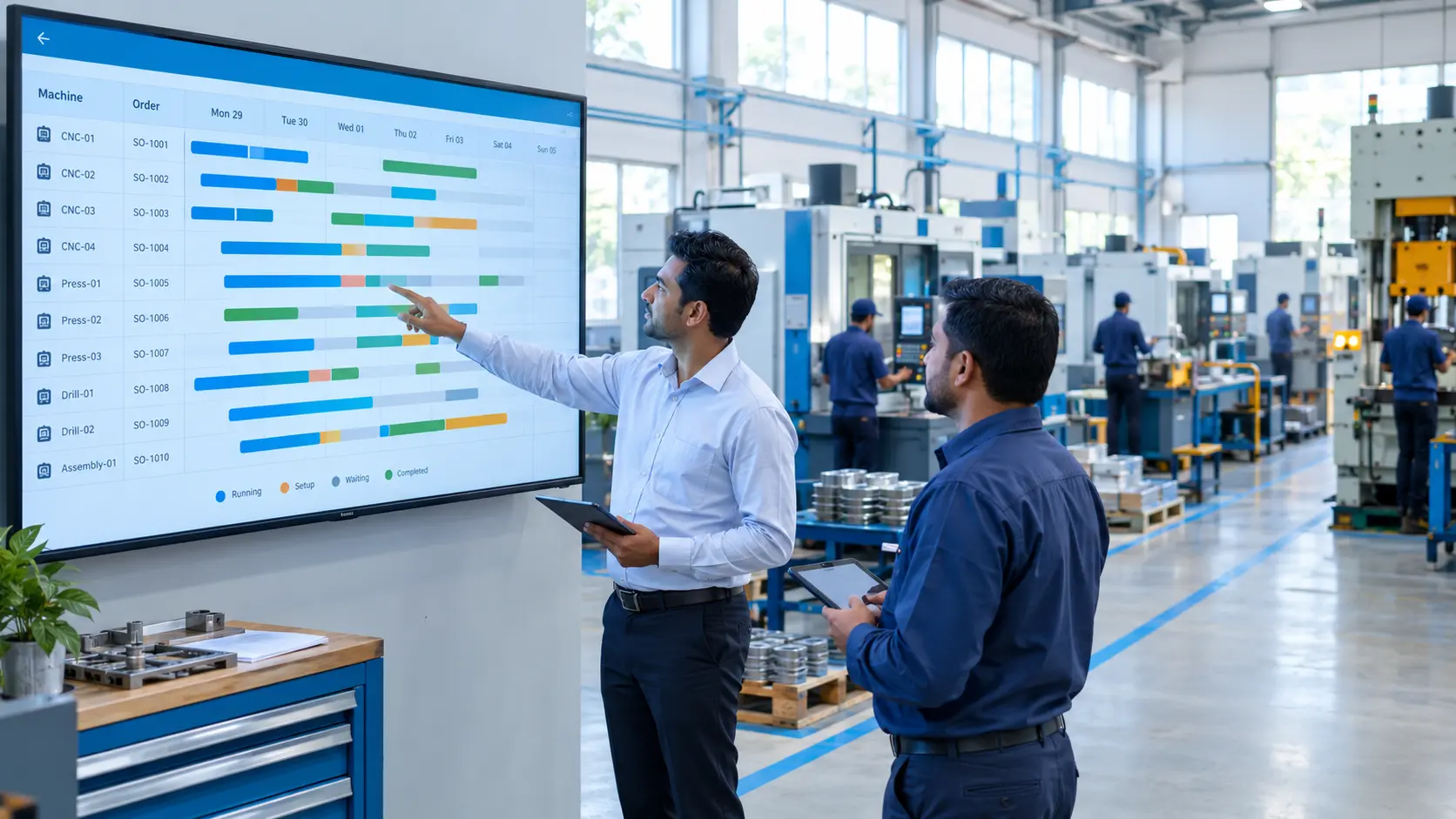
A big order comes in, and sales promises delivery in three weeks. Two weeks later, the shop floor discovers that the key machine is booked for another job and one raw material hasn’t arrived. The result is overtime, rushed shifts and an apologetic call to the customer. For many MSME manufacturers, this cycle repeats every busy season. Good production planning breaks it by matching orders to real machine capacity and material availability before dates are promised. In this post, we explain why delivery dates slip, how an ERP builds a realistic production schedule, and how to roll it out step by step.
Key Takeaways
- Delivery dates slip when orders are promised without seeing machine load and material availability.
- An ERP links sales orders, bills of materials, stock and machine capacity in one plan.
- Realistic schedules reduce overtime, rush purchases and last-minute changes on the shop floor.
- Start with one production line, then scale once the plan matches what actually happens.
Why Delivery Dates Slip in MSME Manufacturing Units
In many plants, planning lives on a whiteboard, in a spreadsheet or in the head of one experienced supervisor. It works until orders pile up.
Sales commits dates based on past experience, not current machine load. Production finds out about the order only when it reaches the floor. Purchase hears about the material requirement even later. Each team is doing its job, but nobody sees the full picture.
When several urgent orders compete for the same machine, the plan changes daily. Jobs are split, setups multiply and workers stay back for overtime. Costs rise, quality suffers under pressure, and customers still receive goods late.
The festive and year-end season makes this worse, as order volumes rise and buyers expect firm dates. Plants that can quote reliable timelines win repeat business; those that can’t end up competing on price alone.
What Production Planning in ERP Is and How It Works
In an ERP, production planning connects what customers want, what you have and what your plant can make, so every schedule is based on real constraints rather than guesswork.
Orders and demand
Confirmed sales orders and forecasts form the demand. The ERP shows what must be produced, in what quantity and by when.
Material requirement planning
Using the bill of materials, the ERP calculates the raw material and components each order needs. It checks current stock and open purchase orders, then flags shortages and suggests purchase quantities and dates.
Capacity and machine load
Each machine or work centre has its capacity, shifts and planned maintenance recorded. The ERP shows how much load is already booked, so new work orders are scheduled where there is real capacity.
Work orders and shop-floor tracking
Approved plans become work orders with operations, machines and target dates. As operators report completed quantities, the plan updates and delays become visible early.
Key Benefits of ERP Production Planning
A connected plan changes the conversation from firefighting to forward planning.
Realistic delivery dates
Sales can check machine load and material status before committing. The dates you promise are dates you can meet.
Less overtime and fewer rush jobs
Balanced schedules spread work across machines and shifts. Overtime becomes a planned choice for genuine peaks, not a daily habit.
Fewer material surprises
Shortages are flagged when the order is planned, not when the job reaches the machine. Purchase gets time to buy at normal prices instead of paying for urgent delivery.
Better machine utilisation
Grouping similar jobs reduces changeovers, and idle machines are easy to spot. Owners can see where capacity is short and where it is wasted, which helps with expansion decisions.
Early warning on delays
When a job falls behind, the ERP shows which orders will be affected. The team can reschedule or inform the customer early, which protects trust.
Implementation Roadmap: From Bill of Materials to a Live Production Schedule
A production plan is only as good as the data behind it, so the rollout begins with accurate masters and grows in phases.
- Build accurate bills of materials. Record every component, quantity and routing step for your main products.
- Define work centres and capacity. Record machines, shifts, setup times and realistic output rates.
- Clean stock and lead-time data. Make sure opening stock and supplier lead times are correct, so material planning can be trusted.
- Run a proof of concept. Plan one production line in the ERP alongside the existing method and compare results for a few weeks.
- Pilot with sales and purchase. Let sales check capacity before committing dates and let material plans drive purchase for the pilot line.
- Scale across the plant. Add all lines and products, and introduce shop-floor reporting through terminals, tablets or machine data.
- Review weekly. Compare planned and actual output, adjust capacity figures and refine the schedule.
Checklist: Whiteboard Planning vs ERP-Based Production Planning
The table below shows how planning changes once orders, materials and capacity sit in one system.
| Area | Whiteboard or spreadsheet | ERP-based planning |
|---|---|---|
| Promising dates | Based on experience | Based on live load and material status |
| Material needs | Worked out manually per order | Calculated from the bill of materials |
| Machine load | Known to the supervisor | Visible to sales, production and owners |
| Shortages | Found when the job starts | Flagged when the order is planned |
| Delays | Discovered at dispatch | Visible as soon as a job falls behind |
| Overtime | Frequent and unplanned | Planned for genuine peaks |
How Tassos Can Help
Tassos Consultancy Services Private Limited offers a configurable manufacturing ERP with production planning connected to sales, inventory, purchase and finance. We set up bills of materials, work centres, capacity rules and work-order tracking around the way your shop floor already runs.
As a solution integrator, we can connect machines through IoT, so output counts and machine status flow into the plan automatically instead of being entered by hand. MIS dashboards give owners a live view of order status, machine load and delays.
Every engagement follows our POC to Pilot to Full-Scale Deployment approach, starting with one production line before expanding plant-wide. Our Ahmedabad-based team supports data setup, training and post-go-live support.
Conclusion
Missed delivery dates and constant overtime are signs that planning is happening in separate places. When orders, materials and capacity are planned together, schedules become realistic and the shop floor stops firefighting.
ERP-based production planning helps you promise dates with confidence and keep them, even in your busiest season. To discuss planning for your plant, talk to our team at info@tassosconsultancy.com.
10. FAQs (add as FAQ block for rich results)
Q: What is production planning in ERP?
Production planning in ERP connects sales orders, bills of materials, stock and machine capacity in one system. It calculates what to make, which materials are needed and when each machine is free, then turns the plan into work orders. As production is reported, the schedule updates automatically.
Q: Will ERP production planning eliminate overtime completely?
No. ERP planning reduces unplanned overtime by spreading work across machines and shifts based on real capacity. During genuine peaks, some overtime may still be needed, but it becomes a planned decision made in advance rather than a daily reaction to shortages, breakdowns or unrealistic promises.
Q: What data do we need before starting ERP production planning?
Accurate bills of materials, work centre capacities, shift timings, setup times, opening stock and supplier lead times. These masters drive every calculation. If they are wrong, the plan will be wrong too, which is why data setup is the first step of any rollout.
Q: Does ERP planning work for make-to-order manufacturers?
Yes. Many MSME plants are make-to-order or mixed. The ERP plans each confirmed order against current capacity and material availability, so even custom jobs get realistic dates. Standard products can be planned from forecasts, while special orders are slotted in where capacity allows.


0 Comments